The AI platformbuilt for game development.for Unity and Godot.that works inside the engine.
Describe what you want and a Crew of AI specialists builds it inside the engine, one reviewable change at a time: scenes, nodes and components, not just source files. Start fresh with Godot set up for you, or open your Unity or Godot project.
EngineForge is AI game development software for macOS and Windows: start a new Godot game with the engine set up for you, or open an existing Unity or Godot project.
Two engines, natively
Unity and Godot, each through the structures that engine actually uses.
Five agents
Maestro leads every session and brings in Builder, Juicer, Systems Smith or Playtester as the work needs.
Godot, managed
Start a new game and EngineForge downloads, installs and runs Godot for you.
Playtests on your call
Try a change yourself, send the Playtester, or turn on Auto Playtest.
Get started
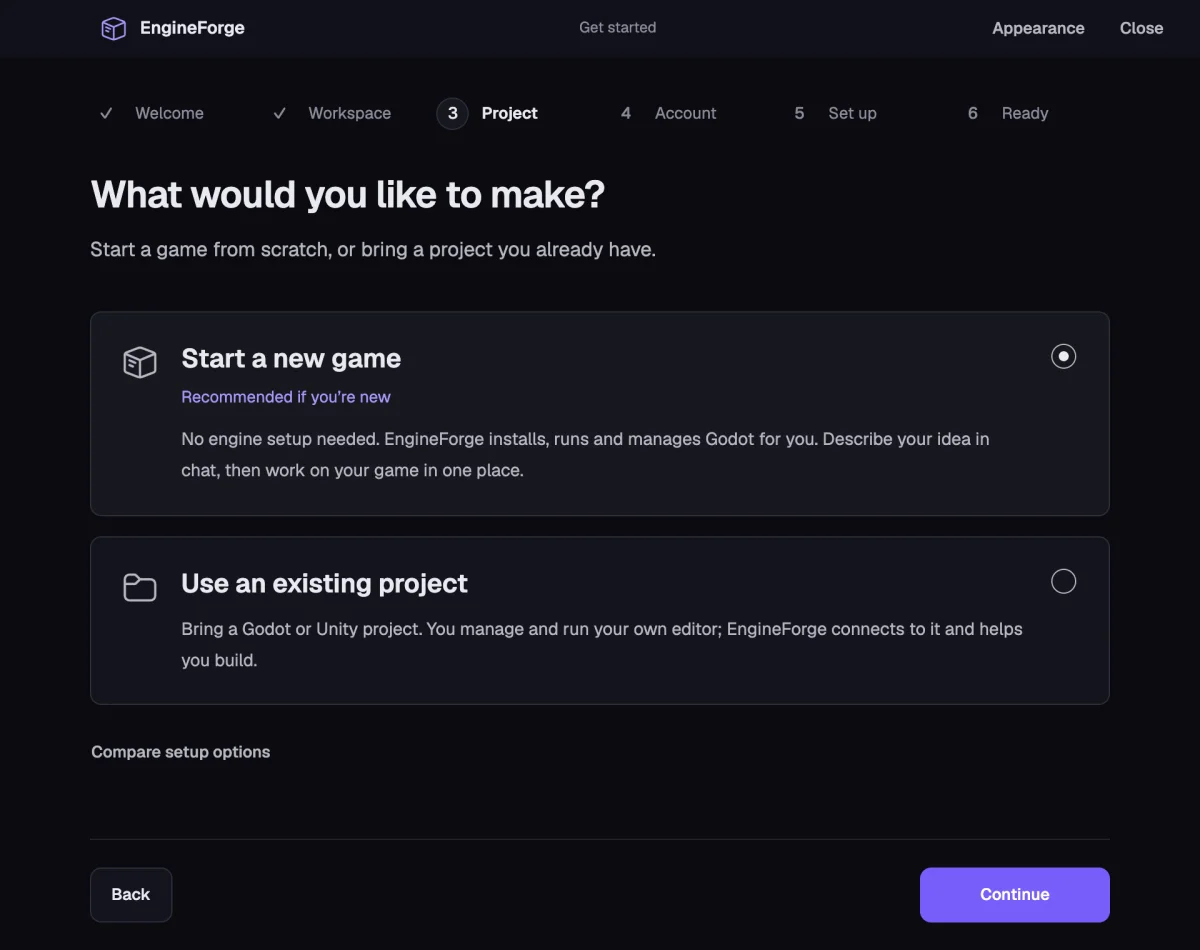
Two ways to start.
Start from an idea with no engine to install, or bring the project you are already working on. Both open in the same Cockpit with the same Crew.
Recommended if you are new
Start a new game
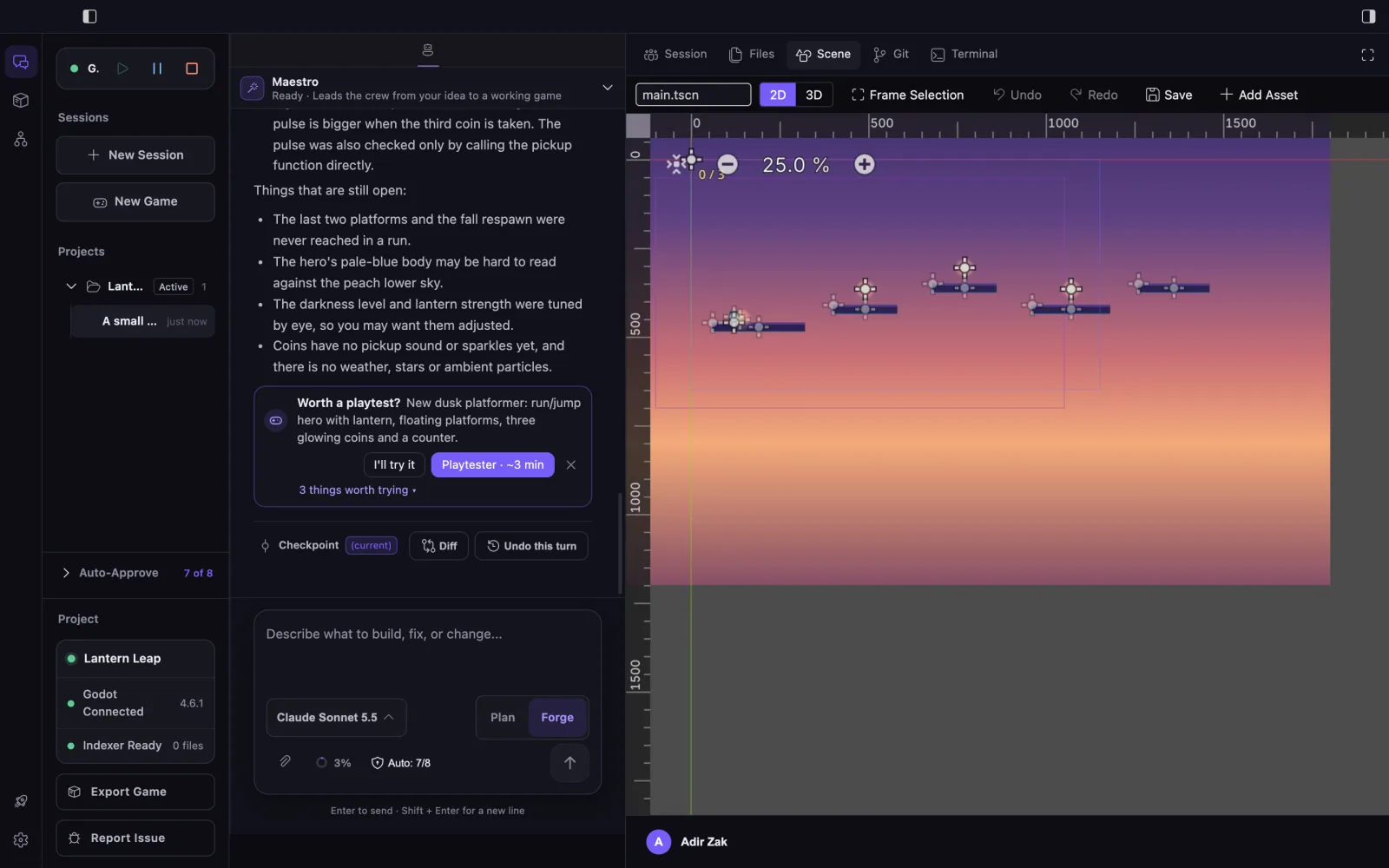
No engine setup needed. EngineForge downloads, installs and runs Godot for you, creates the project, and opens it in the Cockpit with a Scene view, Play and Stop.
1Choose Start a new game and name it
2EngineForge sets up Godot 4.6.1 for you
3Describe your idea; the Crew builds it in the Scene view
Bring a Unity or Godot project you already have. You keep running your own editor; EngineForge connects to it and works inside the project. Nothing is converted.
1Choose the folder with your Unity or Godot project
2Open the same project in your own editor
3EngineForge connects and the Crew works inside it
Get started: start a new game or use an existing project.
A new game, built by the Crew in Godot that EngineForge set up and runs.
Managed Godot runs on macOS and Windows. Managed games use GDScript and Godot's Compatibility renderer; see the limitations.
The product
A real session, replayed.
Pick a scenario and watch one task travel from request to a result you can read and review. Maestro leads every session and brings in the specialist the work needs. Switch to Classic to follow the same work from the full editor surface.
AgentStoreGraph
Godot projectconnected
Sessions + New
Add a dash ability
Fix enemy pathfinding
Juice the hit feedback
Projects
Neon Driftactive
Skybound7
Earlier in this session
Set up the player scene with a basic move script
M
Maestro · lead
Created player.tscn with a CharacterBody2D root and wired move_and_slide() into the physics step.
Add a dash ability to the existing player controller
M
Maestro · lead
Builder· Builds mechanics, controls and scenes0:00
Write File› player_controller.gd
M
Maestro
Code checkpointDiffRestore(current)
Ask your crew to build something…
ForgeSelected modelAuto-Approve on
Your Squad
MMaestrolead
BBuilder
JJuicer
SSSystems Smith
PTPlaytester
Changes · This session
Now
Add a dash ability+18 −2
Two surfaces, one project. Cockpit for the AI-first workflow, Classic Editor for the full editor, on a project whose engine you run yourself. Games made with Managed Godot stay in the Cockpit.
More than code
A game is more than its source files.
Three different questions need three different layers: what the project contains, how the engine wires it together, and what actually happened when you pressed play. EngineForge holds all three.
Current taskAdd a dash abilityOne task · three questions
ImplementationConnectionBehavior
Unity + Godot
One intent. Two native paths.
No fabricated universal engine model. EngineForge follows the structures each engine actually uses — scene tree and nodes in Godot, GameObjects and components in Unity.
Illustrative task
“Change the player’s dash cooldown to 1.2 seconds.”
A Crew of specialists, a managed engine, project context, playtesting and export — one platform instead of five tabs and a chat window.
Specialist Crew, led by Maestro
Maestro leads every session. It reads your request, sends each part to the specialist who owns it, one at a time, checks what comes back, and tells you what changed.
Turn a Godot game into desktop builds for macOS, Windows and Linux with its name, icon and version. Every build says what was checked, and your project is never changed.
macOS · Windows · LinuxYour own icon or a generated oneStartup checked
Auto-indexes the project on first load — scripts, connections, inheritance, signals — and gives that architectural view to the Crew. Plus an interactive graph you can drill into.
Local indexRelationshipsDrill-downProject search
Checkpoints & review
File changes are checkpointed around each agent turn. Review the diff and undo a turn's file changes. Editor and running-game state are not part of a checkpoint.
Sound, music and web search
Agents create sound effects, music and character voice lines from a set of synthetic stock voices (no voice cloning), and search the web for references. Generation uses credits.
Asset Store
Search and download reusable game assets from external sources. Check the source and item license before using an asset in your game. EngineForge does not sell these assets.
Workflow
From prompt to playable.
The usual path through EngineForge. A task pulls in only the context, engine actions and runtime observation it actually needs.
01
Describe
Say what you want to build, fix or understand in the current project.
Developer request02
Understand
Maestro and the specialist it brings in read the relevant code, scene and engine context.
Relevant context03
Build
Plan mode for investigation when it's needed, then Forge for the implementation.
Supported work04
Play & review
Try it yourself or send the Playtester, then read the diff and keep the change or undo it.
Reviewable result
Engine support
Built for the engines you use.
Unity and Godot are supported today, each with its own context model and capabilities. For Godot, EngineForge can also set up the engine for you and export your game.
Unity
Unity 2021.3 or later in your own editor: C# project context, scenes, GameObjects, components, prefabs, editor actions and runtime workflows. URP is not required.
Managed by EngineForge for new games, or in your own Godot 4.0+ editor: GDScript, scenes, nodes, signals, autoloads, 2D world editing, runtime workflows and desktop export.