Export Game
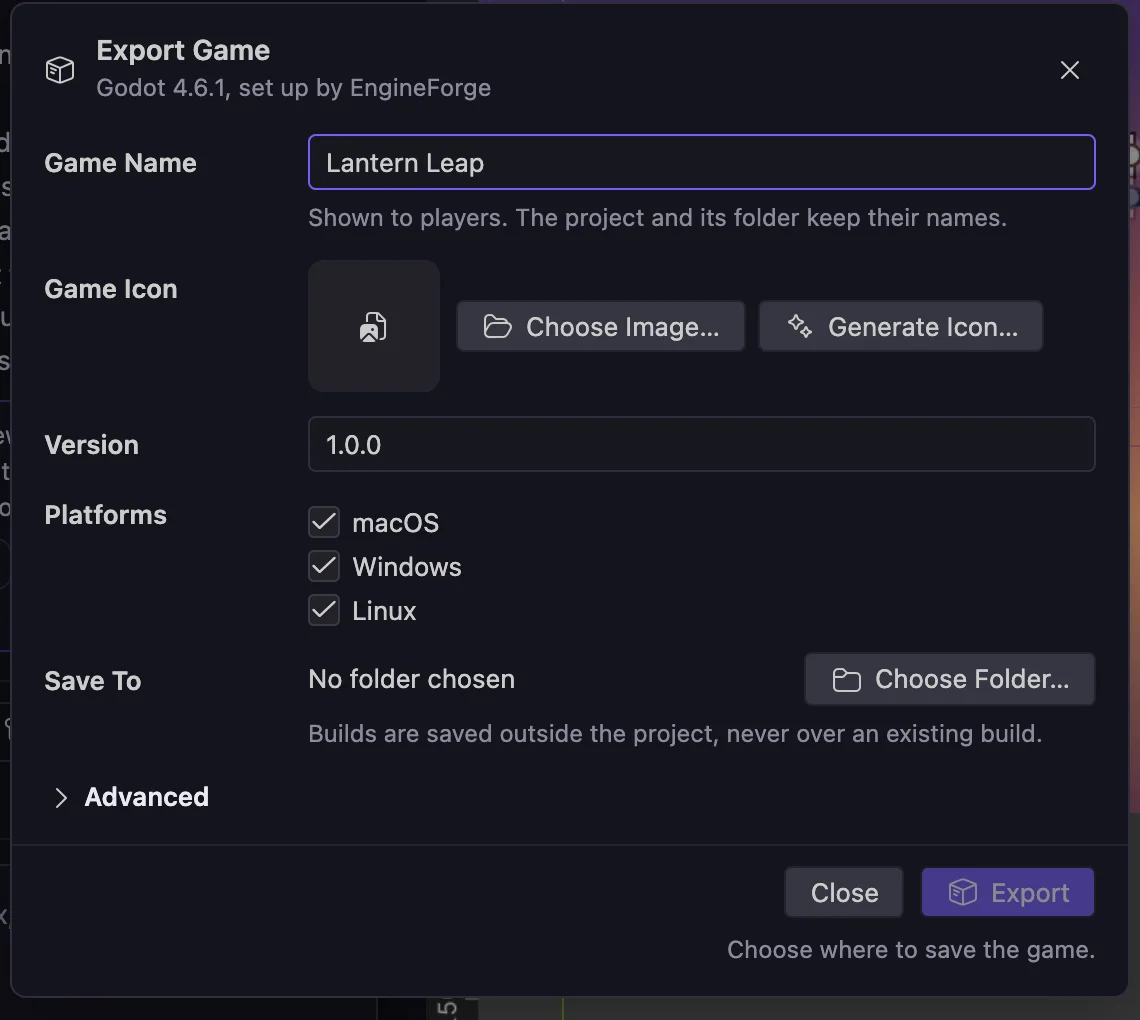
Turn a Godot game into desktop builds you can share: macOS, Windows and Linux, with the game's own name, icon and version. Open Export Game from the Cockpit sidebar or File, Export Game, or ask the agent to export it.
Platforms
- macOS: Universal app (Apple Silicon and Intel), ad-hoc signed, not notarized.
- Windows: x64.
- Linux: x64.
Export a game
- Open Export Game from the Cockpit sidebar or File, Export Game. Or ask in chat; Builder handles exports and asks about the icon before it exports.
- Enter the Game Name players see. The project and its folder keep their own names.
- Choose a Game Icon: pick an image, or generate one. Generating uses credits and shows you the result first; your game keeps its current icon until you choose Use Icon.
- Enter a Version such as 1.0.0, and choose the platforms.
- Choose where to save. Builds go outside the project and never over an existing build.
- Choose Export, then Show Last Export to open the result.
Bundle ID
Under Advanced, the Bundle ID identifies the game to the operating system. It stays the same when you rename the game, so players keep their saves. Changing it makes the game a different app, and players who update may lose settings and permissions, so EngineForge asks you to confirm.
What each build tells you
Every export reports what was actually checked, never more:
- Built
- Archive checked: complete and as built
- Startup checked on this computer, using a test copy
- Not tested on other operating systems
Your project is safe
EngineForge saves your work, copies the project, and exports the copy. Your project files are not changed.
Export templates
The first export downloads Godot's official export templates, about 1.2 GB, downloaded once per machine and Godot version. Later exports reuse them.
Limitations
- Export works with Godot projects on Godot 4.6.1, managed or in your own editor. Unity projects and other Godot versions are not exported by EngineForge.
- Builds are for sharing and testing. EngineForge does not publish to stores, notarize or code-sign exported games, or make installers.
- Because macOS builds are not notarized, players on a Mac may see a warning that the app cannot be verified the first time they open it. They can open it anyway from System Settings, Privacy & Security, Open Anyway (on older macOS versions, Control-click the app and choose Open).