Cockpit
The Cockpit is EngineForge’s focused workspace: chat with the Crew, your files and changes, and for managed games the Scene view, in one window.
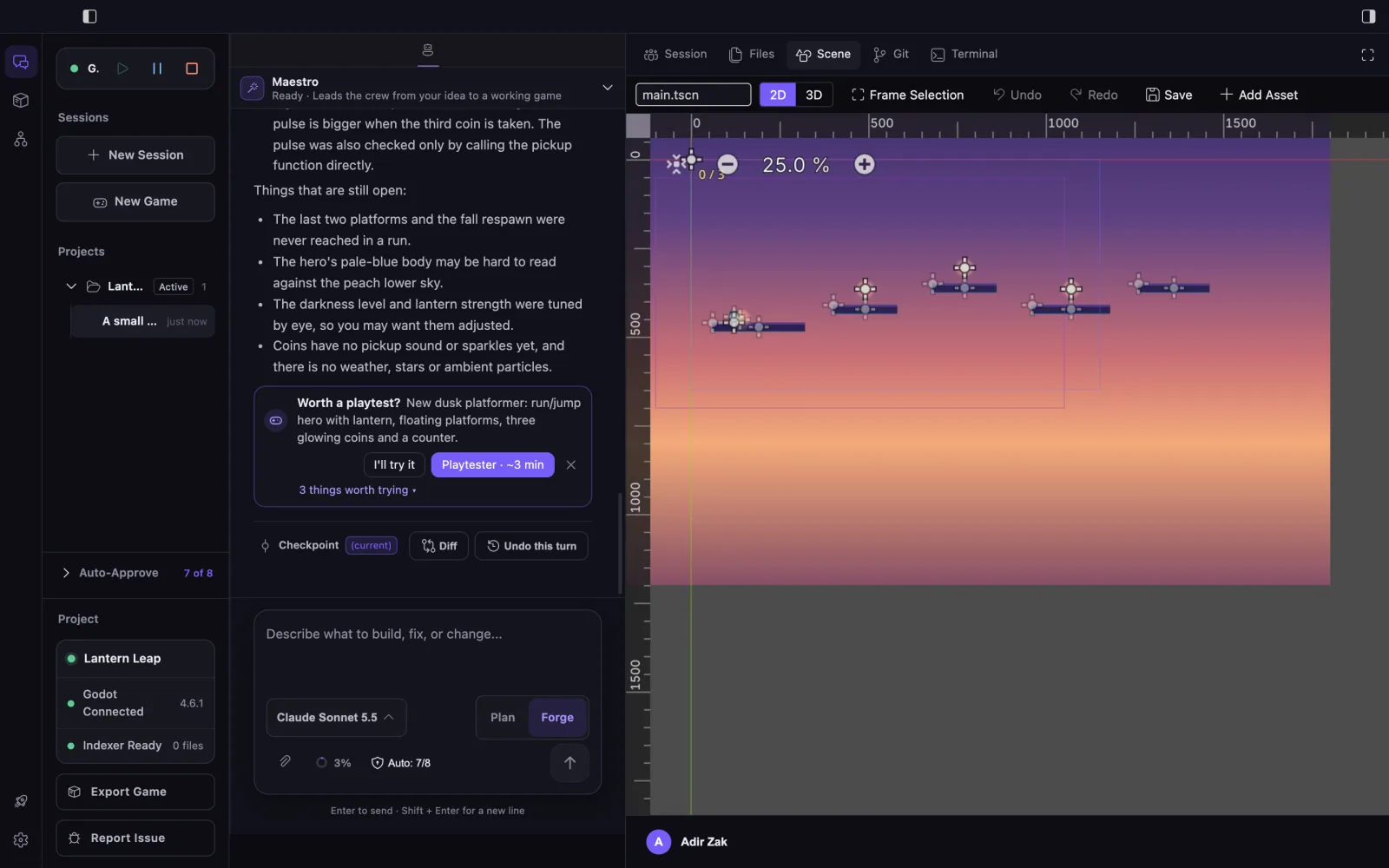
Primary areas
- Rail: Agent, Store (Asset Store) and Graph (Code Graph), plus Get Started, Classic Editor and Settings.
- Sidebar: Play, Pause and Stop for the game; Sessions with New Session and New Game; Projects; Auto-Approve; project, engine and indexer status; Export Game for Godot projects; Report Issue.
- Chat: the conversation with Maestro, specialist delegation cards with live tool activity, playtest cards, checkpoints, and the composer with the model picker and Plan or Forge.
- Workspace tabs: Session (Your Squad and Changes This Session), Files, Scene for managed Godot games, Git and Terminal.
Work from the composer
- Choose a project and session, or start a New Game.
- Use Edit in Your Squad to choose which specialists Maestro can bring in.
- Use Plan mode for read-only investigation, then Forge when changes are intended.
- Respond to any approval requests and to the Worth a playtest? card.
- Review Changes This Session, and use Diff or Undo this turn on a checkpoint.
The Scene view
For a game EngineForge manages, the Scene tab shows the Godot editor viewport inside the Cockpit, in 2D or 3D, with Frame Selection, Undo, Redo, Save and Add Asset. Play and Stop in the sidebar run the game in its own window.
Switch surfaces
Use Classic Editor to move to the full editor layout for the same project. Managed games open in the Cockpit, and while Managed Engine is on, EngineForge stays in the Cockpit instead of switching.
Limitations
Maestro brings in specialists one at a time rather than running the Crew in parallel. Store assets keep each source’s license terms, and Graph completeness depends on local indexing.